Case Study · Application

SearchHome

A real-estate marketplace for the UAE — web and mobile — built around a single product surface that connects buyers, sellers, and agents through search, conversation, and a tiered subscription model.

Open demoPrivate project
Status
LIVE
Launch
In active use
Role
Solo · Product, design, and engineering
User
Buyers, sellers, and agents in the UAE
Stack
ReactReact NativeNode.jsPostgresStripe
01

Overview

SearchHome is a real-estate marketplace for the UAE and the wider Gulf — a single product that connects buyers, sellers, and agents across web and mobile, with a backend that handles the work of listing, discovery, conversation, and subscription in one place.

The product covers the full lifecycle: discover properties through structured search and an interactive map, hold threaded conversations with owners or agents, manage leads and viewings as an agent, and operate the platform through a moderation and verification console.

SearchHome is a bilingual, multi-platform real-estate marketplace — web, mobile, and admin — built around real-time messaging, geo-search, and a Stripe-backed agent subscription model.
Status
In active use
Launch
In active use
Role
Solo · Product + Engineering
Region
UAE · Gulf
Surfaces
Web · iOS · Android · Admin
Languages
English · Arabic (full RTL)
02

Problem

Real-estate discovery in the Gulf is fragmented. Buyers jump between portals that each index a slice of the inventory; agents juggle lead pipelines across WhatsApp, email, and spreadsheets; sellers list on one site, miss the audience of another, and re-enter the same property data three times.

On top of that, the decision itself is multidimensional. Buyers do not filter only on bedrooms and price — they filter on commute feel, neighbourhood rhythm, amenities, and trust in the agent on the other side of the inquiry. Most portals treat those signals as second-class; most tools do not surface them at all.

SearchHome exists to collapse the discovery → conversation → transaction loop into one product, on every device the buyer or agent happens to be on.

03

Users

Three first-party roles share the platform, with a fourth — operator — running moderation and verification behind the scenes. Each role has its own onboarding flow and surface area.

The Buyer

Discovers and inquires

Someone looking to buy or rent in the UAE. Browses listings on web or mobile, narrows by area, price, and lifestyle signals, contacts owners or agents, and tracks favourites across devices.

Pain points

  • Listings scattered across multiple portals with no shared history.
  • Filters that ignore neighbourhood, commute, and amenity signals.
  • Slow, ad-heavy property pages that lose context on mobile.

Goals

  • Find a short, trustworthy list of properties that actually fit.
  • Reach the right agent or owner quickly, in their preferred language.
  • Return later and pick up where they left off — across devices.
The Seller

Lists and responds

An owner or landlord publishing a property. Creates the listing, answers inquiries, and tracks who is serious — without needing a separate CRM.

Pain points

  • Re-entering the same listing across multiple portals.
  • Losing inquiries that arrive while they are away from email.
  • No clear signal about which inquiries are worth a viewing.

Goals

  • Publish once and reach every device the buyer is on.
  • See every inquiry in one inbox, with context preserved.
  • Mark serious buyers and move them toward a viewing.

The Agent

Operates a pipeline

A licensed agent running a portfolio of listings and a pipeline of leads. Uses SearchHome as their primary work surface — subscriptions unlock the listing capacity, lead tools, and analytics they need to operate at scale.

Pain points

  • Lead tracking spread across WhatsApp, notes, and ad-hoc spreadsheets.
  • Platform lock-in between listing volume, featured placement, and pricing.
  • No unified view of which listings are actually performing.

Goals

  • Run a tiered book of business with predictable limits and pricing.
  • Track leads from first contact through to conversion in one place.
  • Surface listings and respond to inquiries from mobile, on the move.
04

Solution

SearchHome is built as three surfaces that share one backend: a web app for browsing and managing listings, a mobile app for the on-the-go agent and buyer, and an admin console for verification and moderation. Buyers, sellers, and agents each have their own onboarding flow and dashboard, and the messaging layer carries the conversation across all of them.

Underneath, the product runs on a small, deliberate set of decisions: a single relational model that owns properties, conversations, leads, and subscriptions; a real-time messaging layer that keeps both sides of a deal in sync; a geo-search experience that ranks by true distance; and a subscription engine that gates listing capacity and lead tools behind predictable tiers.

  1. One product surface across web and mobile. A conversation started on a phone is visible on a laptop, with no separate inbox.
  2. Real-time by default. New inquiries, messages, and status changes reach the other party without a refresh.
  3. Bilingual end-to-end. English and Arabic across the full product, with full right-to-left layout for Arabic readers.
05

Key Features

The product capabilities that anchor the SearchHome experience. Each one ships across web and mobile, with the admin console carrying the moderation and verification work behind it.

Structured + map search

Filter by property type, price, bedrooms, and area, then pivot to an interactive map view that re-ranks results by true distance and surfaces a preview card on each pin.

Real-time messaging

Threaded conversations between buyers, sellers, and agents, with typing indicators and read receipts. The same conversation appears in every surface the user signs into.

Threaded inquiries

Buyers can ask follow-ups on the same inquiry without losing context; agents see the full thread before they reply, with the property attached.

Favourites and named wishlists

Single-tap favourites for casual saves, plus named wishlists for serious shortlists — with a share link so buyers can send a curated list to a partner.

Saved searches with alerts

Save a search with criteria; new matching listings trigger an in-app, email, or push notification depending on the user's preferences.

Multi-step listing wizard

A guided flow for creating a listing — basics, details, location, pricing — followed by an in-app camera and gallery step for photos. The same flow runs on web and mobile.

Agent pipeline

Leads move through a six-stage pipeline from new to converted, with priority, source, and an activity log. The agent's day is the pipeline.

Tiered subscriptions

Three agent tiers gate listing capacity, featured placement, lead tools, and analytics. Billing runs through Stripe with idempotent webhook handling.

Admin moderation

Operator console for approving listings, verifying agents, and managing users. Property and agent moderation keep inventory trustworthy without slowing publish.

Multi-channel notifications

Fourteen notification types, delivered across in-app, email, push, and SMS, with per-type preferences, quiet hours, and a weekly digest for low-priority items.

Bilingual UI with full RTL

English and Arabic across the entire product, with right-to-left layout switching at runtime so the layout, navigation, and forms read naturally in both languages.

Mobile offline resilience

Favourite toggles, sent messages, and inquiries are queued on-device when connectivity drops and replayed on reconnect — without the user re-issuing the action.

06

Product Screens

Selected surfaces from the web and mobile apps, captured against the live product.

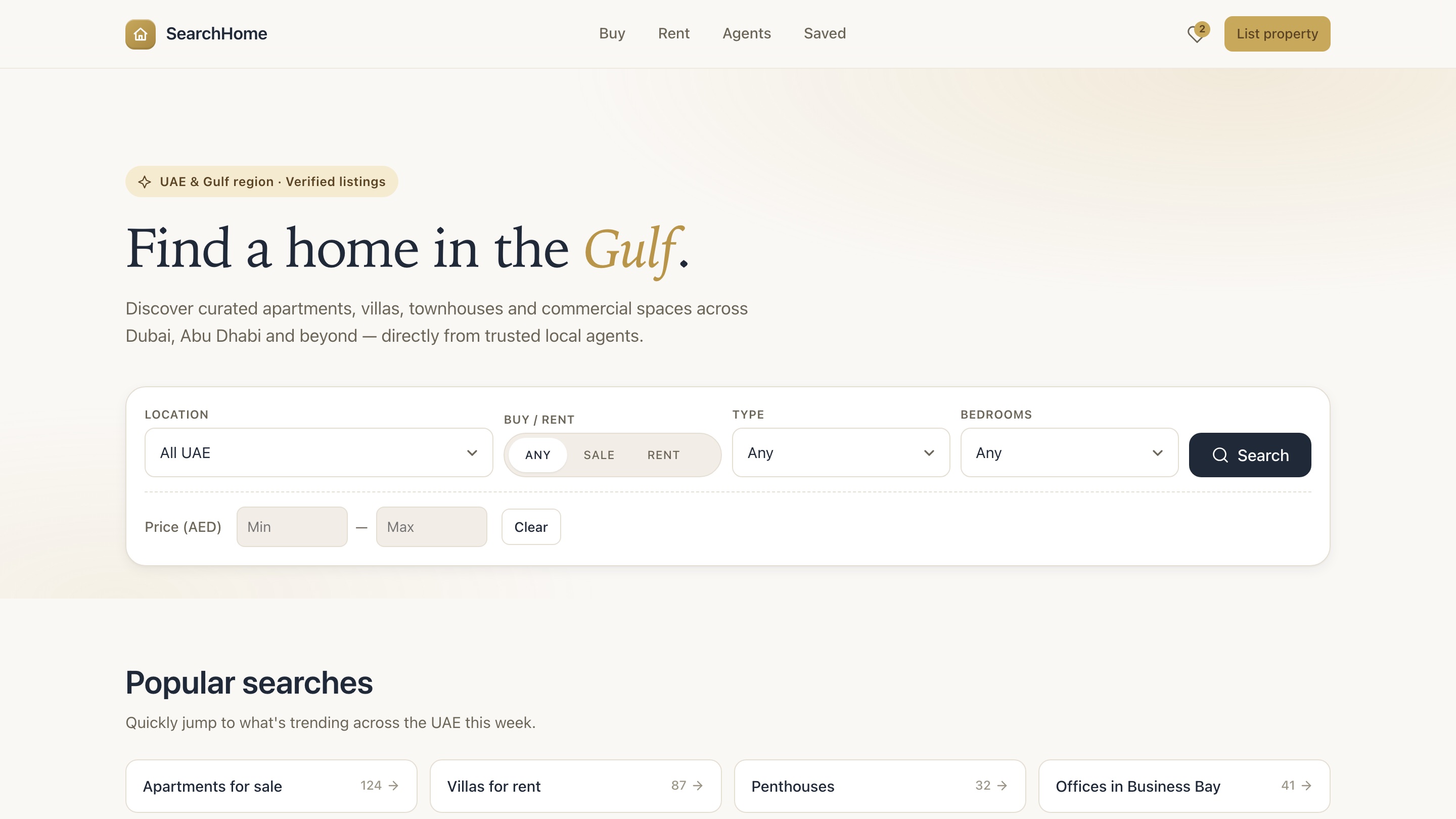
SearchHome web home and search interface
Home and search — Search entry point — location, transaction type, property type, bedrooms, and price range.
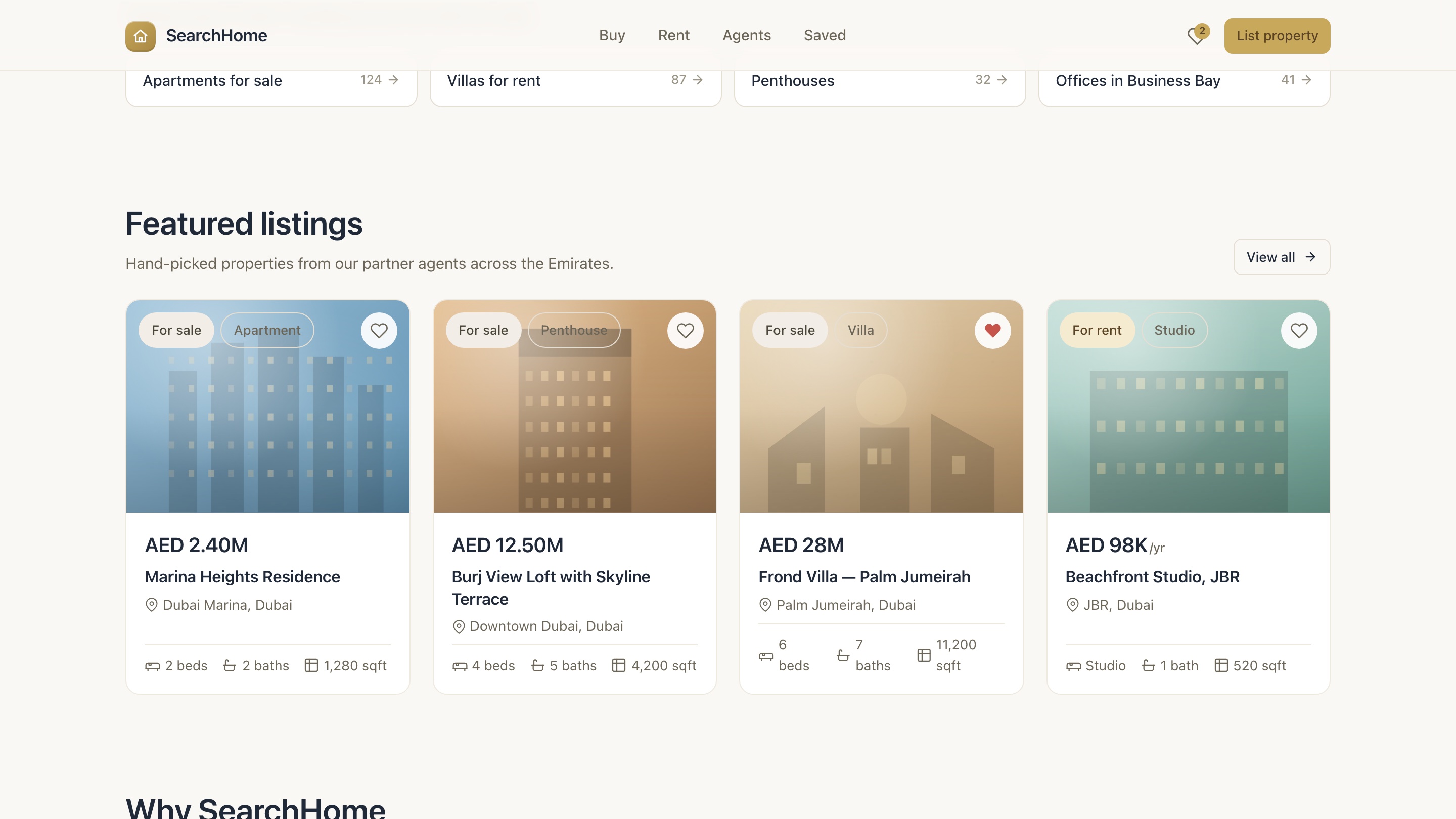
SearchHome featured listings grid
Featured listings — Hand-picked property cards with price, location, and key facts in a scannable grid.
SearchHome property detail page
Property detail — Image gallery, key facts, map preview, and the inquiry path on a single page.
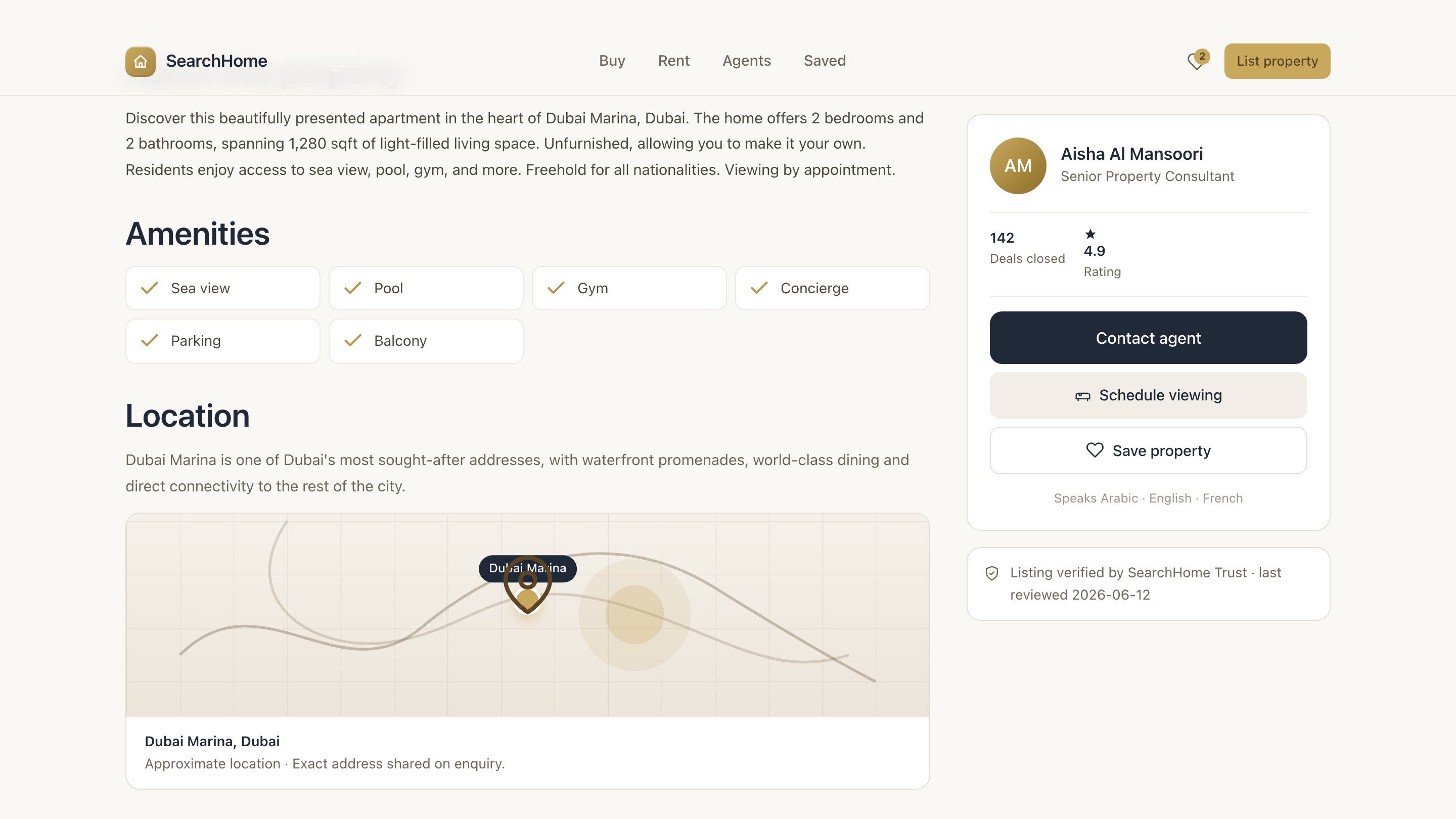
SearchHome property details and amenities
Property details and amenities — Full description, amenities, location map, and the agent contact card on the right rail.
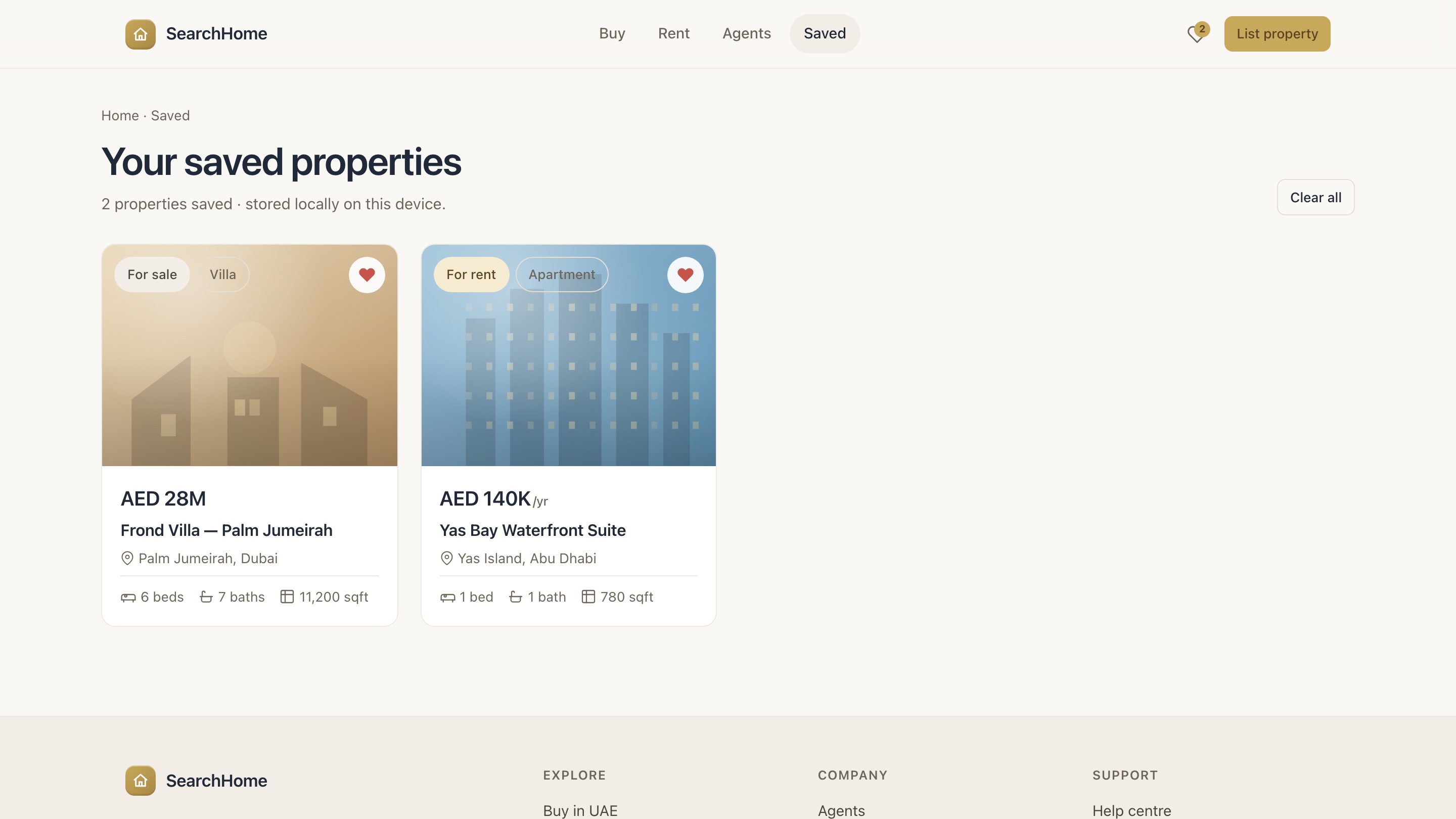
SearchHome saved properties view
Saved properties — Persistent favourites view — properties the buyer has shortlisted, stored locally.
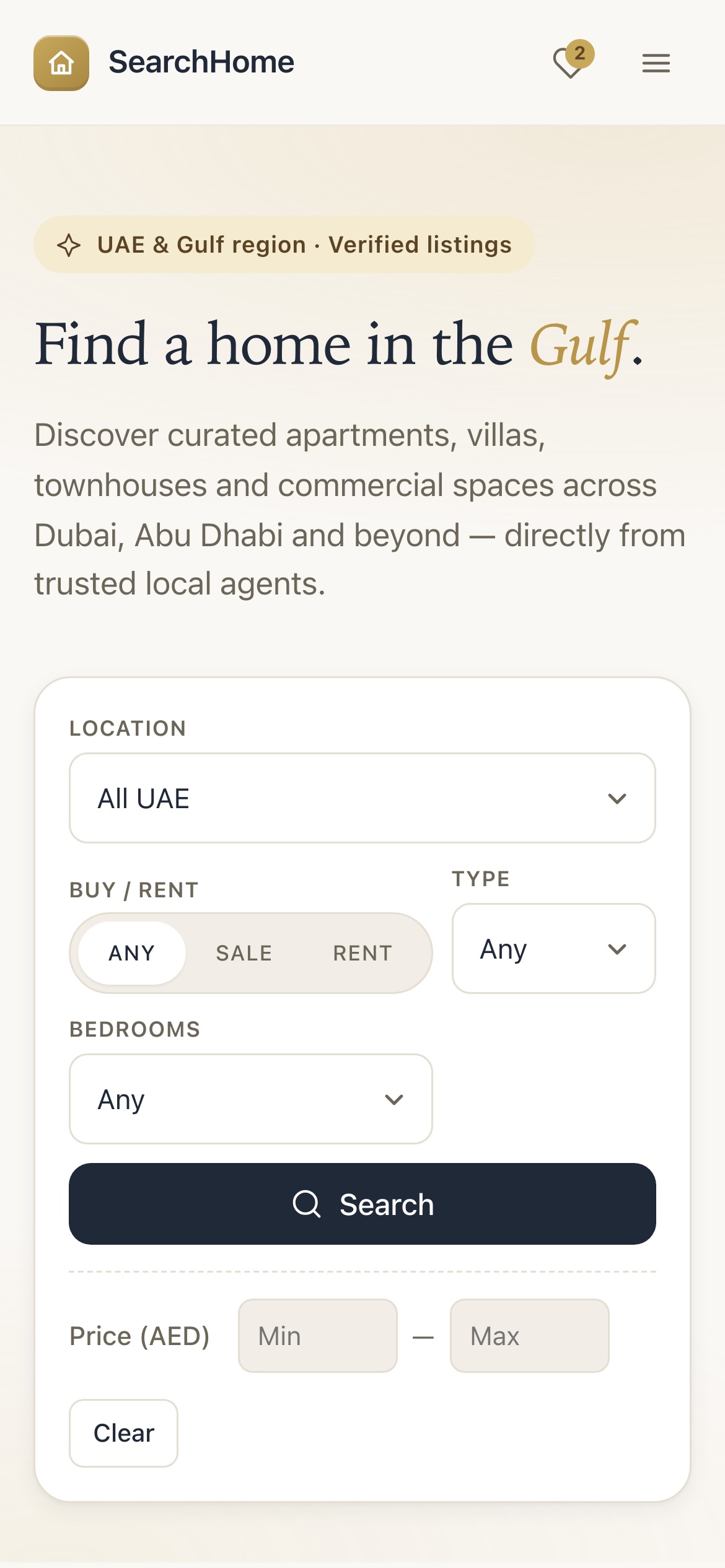
SearchHome mobile home and search
Mobile home — Search interface optimised for phone — the same control surface, reflowed for touch.
07

Technical Architecture

SearchHome is structured as three client surfaces that share one backend. The web app and the mobile app consume the same API and the same messaging layer; the admin console sits behind an additional role gate and uses the same primitives. The boundary between clients and the backend is the product — every feature is reachable from every surface.

The backend itself runs as a small set of services: the HTTP API, a real-time messaging layer that scales horizontally, a worker process that handles deferred work like email and digest delivery, and a relational store with a small set of derived indexes for search and autocomplete. The split is deliberate — anything time-sensitive stays on the request path, anything that can wait goes through a queue.

ComponentPurposeTechnology
Web clientDiscovery, listing management, and account flows on desktop and tablet.React + TypeScript SPA
Mobile clientDiscovery, messaging, and on-the-go agent workflows on phone.React Native (Expo)
Admin consoleModeration, agent verification, and user management.Same web client, role-gated routes
HTTP APIAll client-server traffic — auth, properties, search, leads, billing.Node.js + typed contracts
Realtime layerMessaging, typing indicators, read receipts, presence.WebSocket gateway with shared-session fan-out
Worker serviceEmail, push, digest, and other deferred work.Queue-based background processing
Relational storeSystem of record for properties, conversations, leads, billing.PostgreSQL with geo extensions
Cache and queueHot-path caching and queue transport for the worker service.In-memory and shared cache with queue transport
Object storageProperty images, floor plans, and other media.Provider-managed object storage with on-upload transforms
BillingAgent subscriptions and listing fees.Stripe with idempotent webhook handling

Data model

  • User — buyer, seller, agent, or operator; one profile per account.
  • Property — the unit of inventory, with a seven-stage lifecycle from draft to sold or rented.
  • Conversation and Message — real-time threaded messaging between any two parties.
  • Lead — an agent's view of a buyer, with stage, priority, source, and an activity log.
  • Subscription — the agent's tier and billing state, gated against listing and feature limits.

Architectural detail is summarised at the product level. Specific infrastructure choices, security configurations, and database internals are out of scope for a public case study.

08

Challenges

The engineering problems that shaped the product. Each one is grounded in the work that was actually done — not in aspirational risk lists.

Keeping the conversation in sync across surfaces

A message typed on the mobile app needs to reach the web app within a second, and the read receipt needs to make it back. Doing that on a single instance is easy; doing it on a horizontally scaled API required a shared session layer so any instance can deliver to any connected client.

The same conversation also has to survive a refresh, a reconnect, and an offline period on mobile. The replay path had to be designed before the typing indicator could be honest about what 'delivered' means.

Search that ranks by real distance

Listing volume in dense Gulf cities can produce long result sets, and buyers expect map results to honour distance even when they have not asked for it. The naive approach — sorting by coordinates in memory — collapses past a few thousand properties.

The fix is a bounding-box query against a geo-index on the property store, with a per-page re-rank by true distance on the API tier. That keeps the index cheap and the order honest, at the cost of an explicit second pass on the current page.

Tiered subscriptions without drift

Three agent tiers, each with its own listing cap, featured allowance, and feature gates, are easy to implement and easy to get wrong. The temptation is to put the limits in the UI and check them again in the API; the cost is drift the day someone changes one without the other.

The product ships with a single source of truth for tier rules on the server, enforced as a gate on the request path. The client surfaces the plan for display only. When the rule changes, only one place has to change.

A consistent bilingual product

Shipping English and Arabic is not a translation problem — it is a layout problem. Arabic reads right-to-left, and a product that flips the text direction without flipping the navigation, the form flow, and the icon set looks broken even when the words are correct.

The mobile and web apps both switch layout direction at runtime, with a small set of primitives that are aware of reading order. Every screen ships both languages; partial localisation is treated as a bug, not a backlog item.

Offline behaviour that does not lie

Mobile users lose connectivity in ways the web never sees — elevators, metro tunnels, dead zones between cell towers. A favourite toggled in that window should not silently vanish, and a message sent in that window should not appear to fail.

The mobile app persists a small queue of deferred actions and replays them on reconnect, with a hard retry cap so a poison-pill action cannot wedge the queue forever. The user sees the action as pending until it lands, and never has to retry by hand.

09

Results

SearchHome is live. Production business metrics — active users, listings indexed, conversion, agent retention — are not recorded in the product itself, so they are not reported here. The numbers below are structural counts of the product (surfaces, roles, lifecycle states, languages), not business outcomes.

3Client surfacesWeb, mobile, admin console
4First-party rolesBuyer · Seller · Agent · Operator
7Property lifecycle statesDraft through sold or rented
2LanguagesEnglish + Arabic, full RTL

Outcomes

  • Three client surfaces — web, mobile, and admin — share a single API, a single messaging layer, and a single data model.
  • Real-time messaging, geo-search, and tiered subscriptions ship end-to-end across both client apps, with the admin console carrying moderation and verification.
  • A bilingual product in English and Arabic, with right-to-left layout honoured in every screen of every surface.
  • Mobile clients survive offline periods without losing actions, using a small on-device queue that replays on reconnect.
10

Lessons Learned

What the product taught us. Each lesson is grounded in a real decision that shaped the work, not in advice pulled from a checklist.

Product

  • A subscription product needs one source of truth for tier rules, on the server.

    Limits that live in the UI drift; limits that live in the API become a gate the user feels when they hit them. The rule that lives in both is the rule that gets quietly wrong.

Engineering

  • Treat the request path and the queue as two separate products, with a contract between them.

    Anything time-sensitive stays synchronous; anything that can wait moves through a queue with its own retry and dead-letter story. Mixing them — pushing queue work inline when convenient, or pulling request work onto a background worker when it is slow — produces the worst of both worlds.

  • A real-time surface needs a shared session layer before it needs any feature.

    Once the product had more than one instance behind the API, the messaging layer could not rely on local state. The shared-session layer cost more than any individual feature on the messaging roadmap, and it unlocked all of them.

Process

  • Offline behaviour has to be designed, not patched.

    Adding a queue after the app is live produces a queue that does not match the user's mental model of what happened. Building the queue alongside the action — and surfacing the action as pending until it lands — is much cheaper than re-educating the user.

  • Decisions that change the surface — billing tiers, lifecycle states, role permissions — earn an ADR.

    Architecture decision records are not paperwork; they are how the team agrees on what changed and why. The product moved faster once every tier change, every role split, and every lifecycle decision had a short document attached to it.

Design

  • Bilingual is a layout problem before it is a translation problem.

    Flipping the text direction is the easy part. Flipping the navigation, the form flow, and the icon orientation is the part that decides whether the Arabic version feels native or feels bolted on.